Run-time variables
Run-time variables are variables that may change during run-time or that depend on the event record being processed. These variables are supported in the following fields:
|
For email actions, event variables (e.g. $EVENTID) always reflect the value of the first event contained in the email (since emails may contain multiple records). |

File |
Syslog |
SNMP Trap |
Desktop (Growl) |
Process Action |
Event Log Backup |
Service / Process |
HTTP |
|||||
Sender Name Sender Email |
Subject |
Header & Footer |
Email Msg Override |
File Name |
Prefix |
Custom Data |
Title |
Command Line Arguments |
File Name |
Service Name Process Name |
All Form Fields |
|
$HOSTNAME $HOSTNAMEFQDN $HOSTNAMEALIAS |
X |
X |
X |
X |
X |
|
|
|
|
X |
|
X |
$EVENT... VARIABLES (1) |
|
X |
X |
X |
X |
X |
X |
X |
X |
|
|
X |
$STR1 .. $STR28 $STRelementName |
X |
X |
|
|
|
|
|
X |
X |
|
X |
X |
DATE / TIME VARIABLES (2) |
|
|
|
|
X |
|
|
|
X |
X |
|
|
$LOG |
|
|
|
|
|
|
|
|
|
X |
|
|
$COUNT |
|
X |
|
|
|
|
|
|
|
|
|
|
$IPADDRESS |
|
X |
X |
X |
|
|
X |
|
X |
|
|
X |
$LICENSEE |
|
X |
X |
|
|
|
|
|
|
|
|
|
|
In email actions, the $LOG variable may be resolved to "Various" in the subject if the email contains events from multiple event logs. |

Event Variables (1)
$GROUP
$FILTER
$PACKAGE
$NOTES
$EVENTLOG
$EVENTTYPE
$EVENTSOURCE
$EVENTCATEGORY
$EVENTID
$EVENTUSER
$EVENTDATETIME
$EVENTDATETIMEISO8601
$EVENTNUMBER
$EVENTCOMPUTER
$EVENTMESSAGE
Date / Time Variables (2)
$DAY
$MONTH
$YEAR
$HOUR
$MINUTE
$IPADDRESS: Resolves either to the IP address associated with a host entry in a group, or - if not set there, to the IP address of the interface with the fastest network connection on the system.
Insertion String Variables
Most Windows events are based on templates and contain dynamic values usually called "Insertion Strings" or "Event meta data". These insertion strings are exposed as variables in EventSentry and can be used in most actions.
Insertion string variables always start with $STR and are supported both in numerical (e.g. $STR2) as well as textual form (e.g. $STRIpAddress). The sequence number of an insertion string can be identified with the Event Message Browser, where insertion strings are identified with percentage signs followed by a number, e.g. %1, %2 etc..
Event insertion string are specified with the $STRx variable, where x is replaced with the number from the insertion string. For example, to display the 3rd insertion string from an event in an email subject, $STR3 could be included in the email subject of the action. The above table lists which fields support insertion string variables.
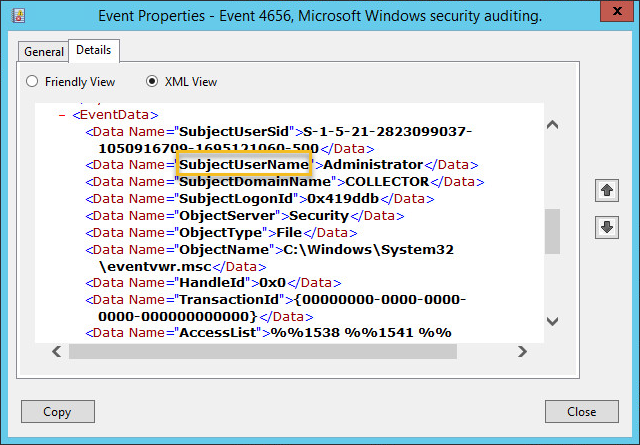
Insertion strings in their textual form are also specified using the $STRx variable, whereas x is replaced with the name of the meta data element. For example, $STRSubjectUserName would resolve to the content of the field SubjectUserName. Data element names can be found in the Windows event viewer in either the "Friendly View" or "XML View" tab of the event details tab.
|
Variable names are case sensitive - only $STRSubjectUserName would resolve to Administrator in the example below, $STRSUBJECTUSERNAME would not! |
Custom variables can have any name, but may only contain letters. Numbers and special characters are not supported in the name of a custom variable. Custom variables are supported in the following fields:
Backup Event Logs
Backup File ("File")
Log File Monitoring
File Path
Filters
Source
Category
Username
Computer
Advanced: Email Subject Override
Advanced: Email Content Override
SMTP Notification
Sender Name
Sender Email
Recipients
Subject
Primary (incl. User & Pass)
Secondary (incl. User & Pass)
Dial
Header & Footer
Character Set
HTTP
Form fields
HTTP Content Type (PUT/POST)
HTTP Content Data (PUT/POST)
Database Notification
DSN Name
Table Name
Username
Password
Syslog
Host Name
Custom data
SNMP + SNPP Notification
Host Name
File
File Name
Character Set
Network Message
NetBIOS Name
Process
Process Name
Arguments
XMPP
Chat room