You can consolidate events from multiple servers and/or workstations to a central database to
•Create a backup of one or more event logs
•Be able to search through multiple event logs network-wide and create reports
•Help become compliant with a variety of regulations, such as Sarbanes-Oxley, PCI, HIPAA and more
In order to setup event consolidation you will need to:
| 1. | Setup the EventSentry database (tables, permissions, indexes) on a supported database |
| 2. | Setup the web reports on a supported web server (IIS or Apache) |
| 3. | Create database action in EventSentry that points to the database |
| 4. | Create one or more filters that reference the database action |
Figure 8 illustrates an event log consolidation in a heterogenous network:
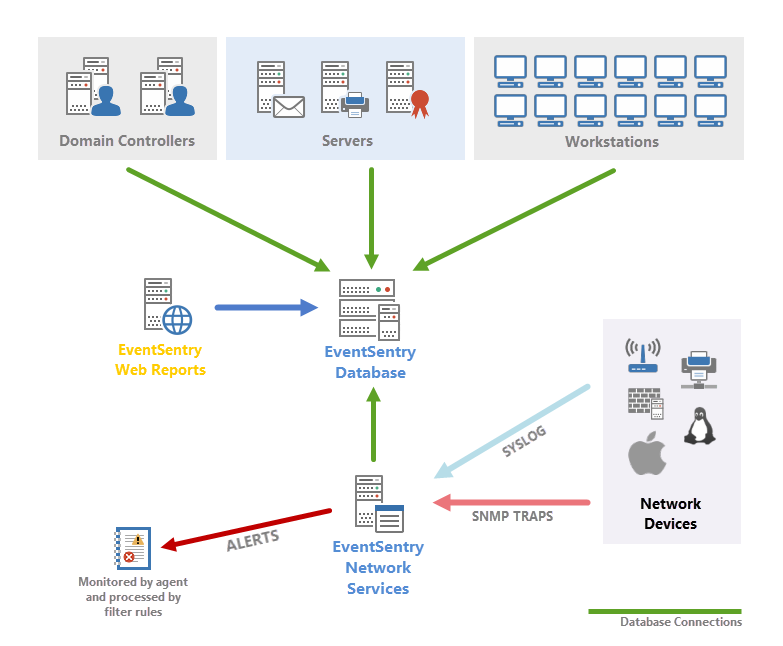
Figure 8
Syslog Message Flow
Using the Syslog feature you can also store events generated on non-Windows device in the database. Unix based machines (here Linux and OpenBSD machines) and many network devices send Syslog messages over the Syslog UDP/TCP protocol to a Windows machine running EventSentry with the Syslog daemon running. This host in turn forwards all Syslog messages, according to your filter rules, to one or more actions.
Starting with version 2.80, the Syslog daemon can also consolidate incoming Syslog messages directly into the EventSentry database, without the need of going through the Application event log. This is useful when you do not need to receive Syslog alerts and/or if you need to consolidate large amounts of data.
| 1. | A Syslog message is sent by a device which supports the Syslog protocol |
| 2. | The Syslog message is received by the EventSentry Syslog daemon |
| 3. | The Syslog message is written to the Application Event Log on that machine |
| 4. | EventSentry, monitoring the Application event log, forwards the event record with the Syslog message |
|
Syslog messages are first written to the application event log where they are then picked up by EventSentry and forwarded to the configured action, according to the configured filters. |