Navigation:  Additional Tips and Resources > Database Tips >

Purging Records

Top  Previous  Next

The event log consolidation and process tracking tables might grow too large after a while. You can configure your system to periodically purge records that are no longer relevant, e.g. after 3 months. This chapter shows:


How to use the included database purge utility to purge records automatically on all supported databases
The SQL Queries needed to purge database records from any feature (e.g. event log monitoring, performance monitoring)
How to setup scheduled jobs on Microsoft SQL Server to automate the purging of records


Alert or Warning 1 24 n g

EventSentry (starting with v2.71) also includes a command-line application that can purge records from the EventSentry database. You can schedule this tool to run on a regular basis using the EventSentry or Windows scheduler. Please see Purging Records Automatically for more information.


Microsoft SQL Server


1.Open "Start" -> "Programs" -> "Administrative Tools" -> "Services" and make sure that the service "SQLSERVERAGENT" is running and set to automatic start mode.


2.Open "SQL Server Enterprise Manager" and navigate to "SQL Server Group" -> "Your Servername" -> "Management" -> "SQL Server Agent" -> "Jobs":


clip0531

3.Right-click "Jobs" in the left pane and select "New Job ..."


4.In the "General" tab, enter a name for the job, such as EventSentry Database Purge


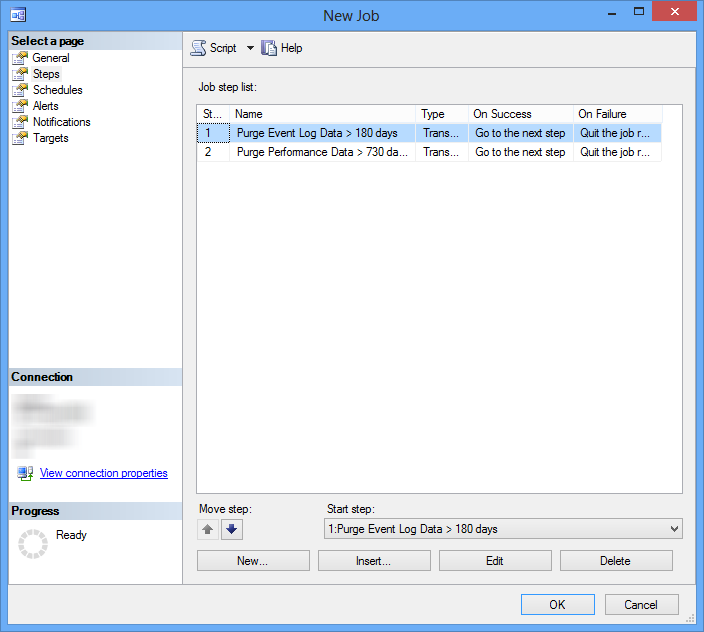
clip0532

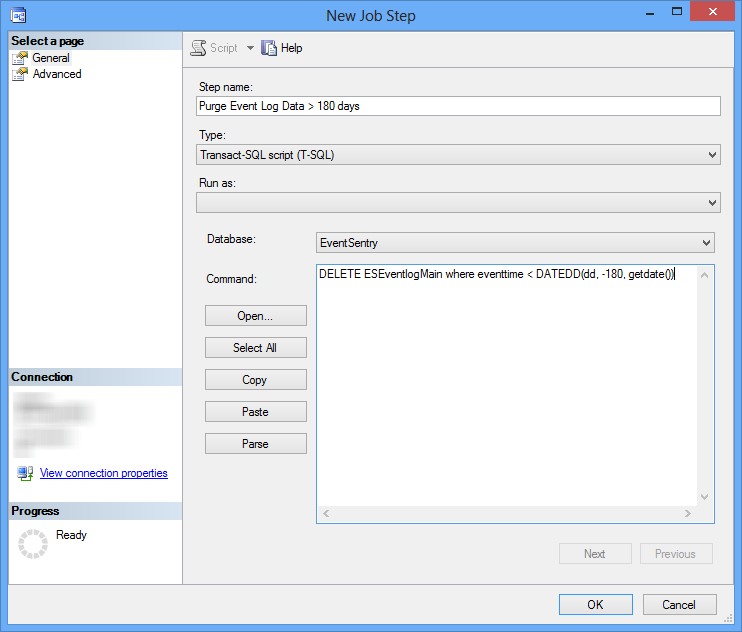
5.Click on "Steps" and create a new step by clicking on the "New" button. In this step we will add a SQL script that deletes all records from the table that are older than 90 days.


clip0533

Apply a descriptive name to this step, set the type to "Transact-SQL Script", select the correct database and paste the following SQL command into the "Command" window:


set QUOTED_IDENTIFIER on;

delete from ESEventlogMain where DATEDIFF(day, eventtime, GETDATE()) > 90


where "EventSentry" is the name of the table and "90" are the number of days you want to keep records in the table. This script will remove all records from the table that are older than 90 days. Click OK to save this step.


Hint: To purge records from other tables as well simply repeat (5) and add another step, adapting the SQL script to reflect the new table name and field containing the time stamp. For the Process/Logon/Print Tracking, disk space, environment, service and application history tables the script would look like this:


set QUOTED_IDENTIFIER on;

delete from ESPSTracking where DATEDIFF(day, start_datetime, GETDATE()) > 90

delete from ESLogonTracking where DATEDIFF(day, start_datetime, GETDATE()) > 90

delete from ESPrintTracking where DATEDIFF(day, start_datetime, GETDATE()) > 90


delete from ESAppHistory where DATEDIFF(day, recorddate, GETDATE()) > 180

delete from ESServiceHistory where DATEDIFF(day, recorddate, GETDATE()) > 180

delete from ESHeartbeatHistory where DATEDIFF(day, recorddate, GETDATE()) > 180


delete from ESPerformance where DATEDIFF(day, recorddate, GETDATE()) > 120

delete from ESDiskspace where DATEDIFF(day, recorddate, GETDATE()) > 90

delete from ESEnvironment where DATEDIFF(day, recorddate, GETDATE()) > 90


delete from ESFileMain where DATEDIFF(day, recorddate, GETDATE()) > 90

delete from ESFileMainDelim where DATEDIFF(day, recorddate, GETDATE()) > 90


delete from ESFilemonHistory where DATEDIFF(day, recorddate, GETDATE()) > 90


6.Click on "Schedules" to specify how often you want to purge records. In our example we will purge records once a week, but you could also run this script daily or bi-monthly. Click on "New Schedule" and add a new recurring schedule. Assign a descriptive name to the schedule and click OK.


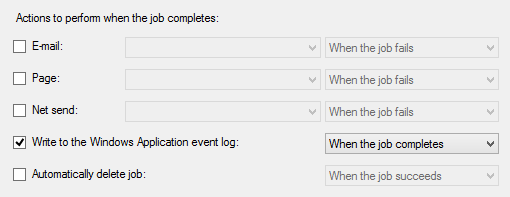
7.At last you can specify whether you want to be notified when this job runs or generates an error. Click the "Notifications" tab and set the desired options. In our case we write an event to the event log every time the job runs:


clip0534


Alert or Warning 1 24 n g

It is recommended that you purge data frequently (with smaller amounts of data affected at each purge) to reduce the impact of the purge on the database. For example, instead of setting up a job to delete records that are older than 180 days, set the job up to run at least once a week. This way each job will affect less data and as such complete more quickly.

MySQL


MySQL does not currently ship with an equivalent of a SQL Server Agent where you would be able to schedule SQL commands. In order to run SQL commands on MySQL you can use a scripting language such as Perl for example, and you can then schedule your scripts using Windows' "Scheduled Tasks". Future versions of EventSentry will ship with an executable that will run SQL commands against a MySQL database.


In the meantime you can use the following SQL statements to purge records that are older than 90 or 180 days:


delete from ESEventlogMain where DATE_SUB(CURDATE(),INTERVAL 90 DAY) > eventtime


delete from ESPSTracking where DATE_SUB(CURDATE(),INTERVAL 90 DAY) > start_datetime

delete from ESLogonTracking where DATE_SUB(CURDATE(),INTERVAL 90 DAY) > start_datetime

delete from ESPrintTracking where DATE_SUB(CURDATE(),INTERVAL 90 DAY) > start_datetime


delete from ESAppHistory where DATE_SUB(CURDATE(),INTERVAL 180 DAY) > recorddate

delete from ESServiceHistory where DATE_SUB(CURDATE(),INTERVAL 180 DAY) > recorddate

delete from ESHeartbeatHistory where DATE_SUB(CURDATE(),INTERVAL 180 DAY) > recorddate


delete from ESPerformance where DATE_SUB(CURDATE(),INTERVAL 120 DAY) > recorddate

delete from ESDiskspace where DATE_SUB(CURDATE(),INTERVAL 90 DAY) > recorddate

delete from ESEnvironment where DATE_SUB(CURDATE(),INTERVAL 90 DAY) > recorddate


delete from ESFileMain where DATE_SUB(CURDATE(),INTERVAL 90 DAY) > recorddate

delete from ESFileMainDelim where DATE_SUB(CURDATE(),INTERVAL 90 DAY) > recorddate


delete from ESFilemonHistory where DATE_SUB(CURDATE(),INTERVAL 90 DAY) > recorddate


Oracle


Oracle does not currently ship with an equivalent of a SQL Server Agent where you would be able to schedule SQL commands. In order to run SQL commands on Oracle you can use a scripting language such as Perl for example, and you can then schedule your scripts using Windows' "Scheduled Tasks". Future versions of EventSentry will ship with an executable that will run SQL commands against a Oracle database.


delete from ESEventlogMain where trunc(sysdate,'DAY') - eventtime + 1 > 90;


delete from ESPSTracking where trunc(sysdate,'DAY') - start_datetime + 1 > 90;

delete from ESLogonTracking where trunc(sysdate,'DAY') - start_datetime + 1 > 90;

delete from ESPrintTracking where trunc(sysdate,'DAY') - start_datetime + 1 > 90;


delete from ESAppHistory where trunc(sysdate,'DAY') - recorddate + 1 > 180;

delete from ESServiceHistory where trunc(sysdate,'DAY') - recorddate + 1 > 180;

delete from ESHeartbeatHistory where trunc(sysdate,'DAY') - recorddate + 1 > 180;


delete from ESPerformance where trunc(sysdate,'DAY') - recorddate + 1 > 120;

delete from ESDiskspace where trunc(sysdate,'DAY') - recorddate + 1 > 90;

delete from ESEnvironment where trunc(sysdate,'DAY') - recorddate + 1 > 90;


delete from ESFileMain where trunc(sysdate,'DAY') - recorddate + 1 > 90;

delete from ESFileMainDelim where trunc(sysdate,'DAY') - recorddate + 1 > 90;


delete from ESFilemonHistory where trunc(sysdate,'DAY') - recorddate + 1 > 90;