|
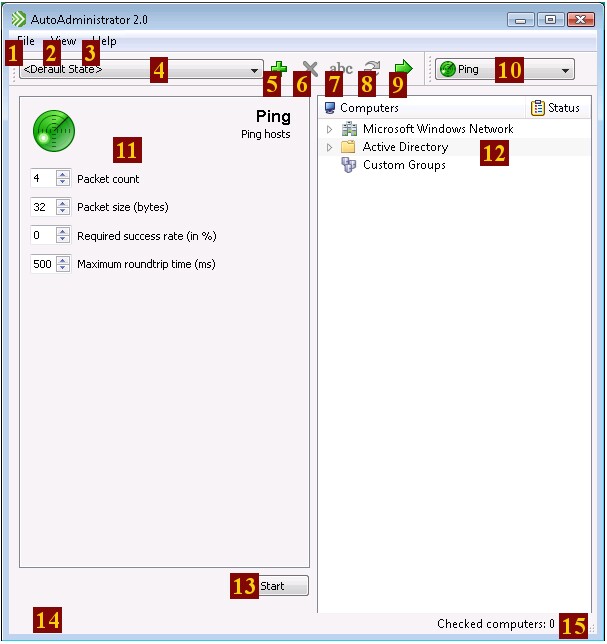
Window Components

|
|
File menu
|

|
|
View menu
|

|
|
Help menu
|

|
|
Preset selector
|

|
|
Add new preset
Creates a new preset based on the AutoAdministrator's current state.
|

|
|
Delete current preset
The current preset is removed. Not available for built-in presets <Last State> and <Default>.
|

|
|
Rename current preset
|

|
|
Update current preset
Changes the current preset to current state of the application. Not available for built-in presets <Last State> and <Default>
|

|
|
Apply current preset
Changes the current state of application to the current preset.
|

|
|
Feature selector
|

|
|
Feature options panel
Contains all feature-specific options.
|

|
|
Network tree view
Allows selection of hosts for update. Selecting a group will automatically select all hosts within that group. Update results are displayed in the status column.
|

|
|
Start/Stop update
The text of this button will change from "Start" for a non-destructive operation to "Update" for a potentially destructive operation to "Stop" while an update is in progress.
|

|
|
Update summary
Following an update, a summary of the number of hosts affected and the time it took is displayed here.
|

|
|
Checked computer count
The number of hosts currently selected for update. The actual number of updated hosts may be less, as this number does not check for duplicate hosts.
|
Basic Use-Case
Performing an action involves the following steps:
| 1) | Use the network tree view to select the hosts to which the update should be applied. |
| 2) | Use the Feature selector to select the action to be performed. |
| 3) | Specify options with the feature options panel, as needed |
| 4) | Apply the update by clicking on the Update button. |
| 5) | Results are displayed in the status column for each computer. Red text indicates a failure, while green text indicates success. |
Custom Groups
Custom groups allow computers to be grouped in an arbitrary fashion. This can be useful, e.g., if there is a subset of a domain that is commonly updated.
Computers can be added to custom groups via the following means:
| • | Drag-and-drop from the Windows Networking or Active Directory lists |
| • | Context menu for the Windows Networking or Active Directory lists |
| • | Context menu for a custom group |
| • | Manually entered names need not exist in Windows Networking or Active Directory |
|


