Navigation: Overview >
General Options


|
Navigation: Overview > General Options |
|
|
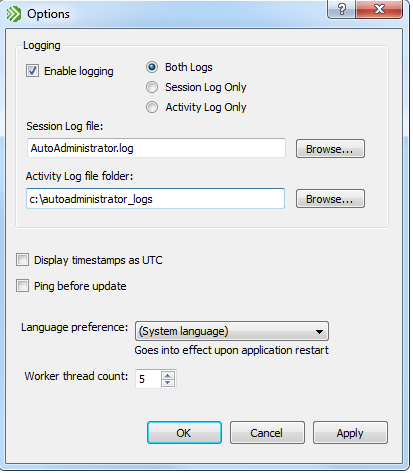
Logging If logging is enabled, a detailed log of all activity is written to one or more log files, depending on which log file options are selected.
Session Log The session log records detailed information about any action performed, including:
There is only one session log, and multiple sessions are appended to the same file.
Example session log:
========================================================= AutoAdministrator Activity Log Date Start: Fri Feb 19 12:44:42 2010 User: DOMAIN.LOCAL\john.smith Computer: WORKSTATION01 --------------------------------------------------------- Feature: Execute Processes Executable: C:\Tools\plink.exe Arguments: -l root -pw canttellyou! $HOSTNAME "uname -a" Process timeout (s): 120 netbsd.unix.local : Exit code: 0 Elasped time (s): 0.76804 NetBSD 5.0 NetBSD 5.0 (GENERIC) #0: Sun Apr 26 18:50:08 UTC 2009 builds@b6.netbsd.org:/home/builds/ab/netbsd-5-0-RELEASE/i386/200904260229Z-obj/home/builds/ab/netbsd-5-0-RELEASE/src/sys/arch/i386/compile/GENERIC i386 Using keyboard-interactive authentication. freebsd.unix.local : Exit code: 0 Elasped time (s): 0.72804 FreeBSD freebsd71.unix-dev.netikus.local 7.1-RELEASE-p6 FreeBSD 7.1-RELEASE-p6 #0: Tue Jun 9 16:26:47 UTC 2009 root@i386-builder.daemonology.net:/usr/obj/usr/src/sys/GENERIC i386 Using keyboard-interactive authentication. openbsd.unix.local : Exit code: 0 Elasped time (s): 1.0111 OpenBSD openbsd45.unix-dev.netikus.local 4.5 GENERIC#0 i386 ========================================================= AutoAdministrator Activity Log Summary Duration: 3 second(s) Average Time: 1 second(s) =========================================================
Activity Logs Unlike the session log, activity logging creates one or more CSV files (separated with the | character) that contain the feature output. The CSV file contains the following information:
Activity logging creates at most one log file per day and feature, with a file name of YYYY-MM-DD_<Feature>.log, for example 2010-02-03_Services.log.
Example activity log, after running "uname" through plink.exe:
Timestamp|Host Name|Result Summary|Result Fri Feb 19 13:00:55 2010|freebsd.unix.local|Ok|Exit code: 0 Elasped time (s): 0.59003 FreeBSD Using keyboard-interactive authentication. Fri Feb 19 13:00:55 2010|netbsd.unix.local|Ok|Exit code: 0 Elasped time (s): 0.78905 NetBSD Using keyboard-interactive authentication. Fri Feb 19 13:00:55 2010|openbsd.unix.local|Ok|Exit code: 0 Elasped time (s): 0.89405 OpenBSD
Ping Before Update This option attempts to ping remote machines before applying updates. If the ping fails the machine is skipped. This is useful for updating machines that may not be online, as the ping will fail faster than an update attempt would.
Language Preference Allows the user to change the language preference. This change will not go into effect until the application is restarted. The list is initialized based on *.qm files found at program initialization. AutoAdministrator currently supports the following languages for the user interface:
Worker Thread Count The number of updates that may be pending at any one time. Once this limit is reached no additional updates will begin until a pending update has completed. |